
第 14 章完成了第一條任務線:玩家和 Guide 對話,蒐集水晶,回報任務,取得 Gold。現在島上已經有目標,但還沒有風險。冒險島如果只有收集物和 NPC,很快會變成散步模擬器;玩家需要一個會改變行動策略的阻力。
本章要加入第一個敵人。它不需要很聰明,只要能巡邏、偵測玩家、追蹤玩家,並在靠近時造成傷害,就已經能讓關卡變得有張力。
這章也會建立一個很重要的觀念:敵人 AI 和傷害判斷屬於 server。client 可以顯示畫面、播放音效、做提示,但不能告訴 server「敵人打到我了」或「敵人應該移動到這裡」。
完成本章後,你會得到:
EnemyAIService。Patrol -> Chase -> ReturnToPatrol 狀態流程。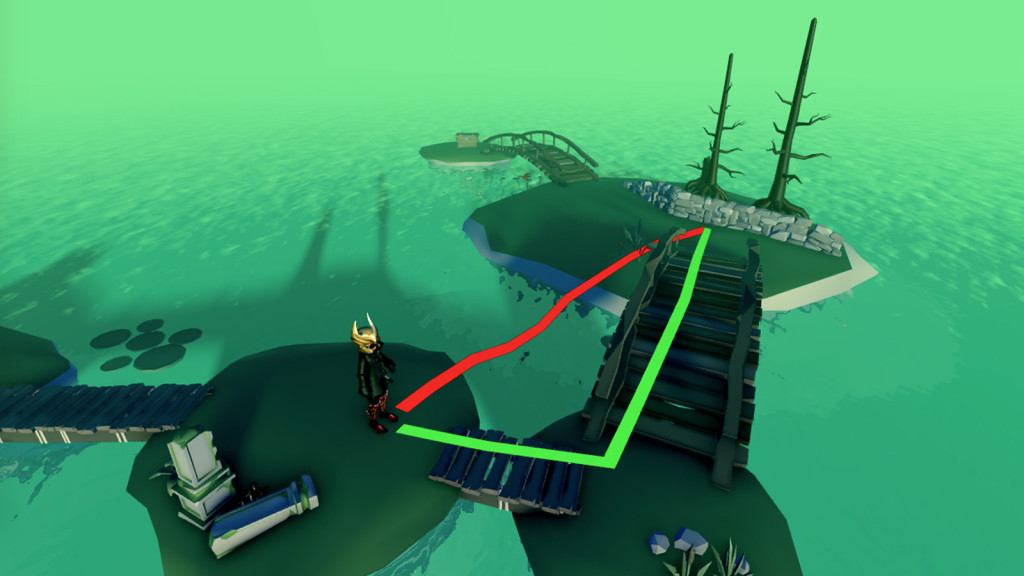
圖 15-1 敵人 AI 需要依導航網格尋路;最短直線不一定是角色實際可走且安全的路徑。
本章使用下列 Roblox 官方文件作為 context:
本章採用這些文件中的幾個原則:
Humanoid 讓 Model 具有角色功能,敵人模型要能移動,至少需要 Humanoid 與 HumanoidRootPart。PathfindingService 可以計算兩點之間的路徑,但 path 可能失敗,不應假設每次都有路。
圖 15-2 測試敵人 AI 時切到 Server 檢查權威 Script 與狀態,再切回 Client 確認玩家實際看到的移動和傷害回饋。
Guide 任務完成後,玩家拿到了第一筆 Gold。下一個設計目標是讓玩家穿過一小段危險區域,前往島的另一側。這個危險區域先不做 Boss,也不做複雜攻擊,只放一個巡邏敵人。
敵人的行為規則很簡單:
沒有玩家靠近:在巡邏點之間移動。
玩家進入 35 studs:轉向追蹤最近玩家。
玩家離開 45 studs:停止追蹤,回到巡邏。
敵人距離玩家 5 studs 以內:每 1.5 秒扣 15 HP。
這裡刻意使用兩個距離:35 和 45。偵測距離比脫離距離短,可以避免玩家站在邊界附近時,敵人在追蹤與不追蹤之間快速閃爍。
本章敵人 AI 使用三個狀態:
Patrol -> Chase -> ReturnToPatrol
這不是完整 AI 架構,但已經足夠建立第一個可玩的敵人流程。
請 Assistant 建立第一版敵人 AI。
【Ch15 主任務|建立敵人 AI】
我們要繼續開發 Roblox Studio 專案「AI Adventure Island」。

現有背景:
- Workspace.AdventureIsland 已經存在。
- 玩家可以蒐集水晶並完成 Guide 任務。
- ServerScriptService 已經包含 QuestService 等 server-side service。
- 本章不要加入 DataStore、掉落物、XP 或戰鬥 UI。

請建立第一版簡單敵人 AI prototype:
1. 如果 Workspace.AdventureIsland.Enemies 不存在,請建立它。
2. 在 Enemies 底下建立一個名為 IslandSentinel_01 的敵人 Model。
3. 敵人 Model 必須包含 Humanoid 與 HumanoidRootPart,才能像角色一樣移動。
4. 建立 Workspace.AdventureIsland.PatrolPoints,並在其中加入三個 Anchored 且不可見的標記 Part:
   - SentinelPatrol_01_A
   - SentinelPatrol_01_B
   - SentinelPatrol_01_C
5. 建立 ServerScriptService.EnemyAIService。
6. EnemyAIService 只能在 server 執行。
7. 敵人使用以下狀態:
   - Patrol
   - Chase
   - ReturnToPatrol
8. 在 Patrol 狀態下,讓敵人在三個巡邏點之間移動。
9. 比較敵人 HumanoidRootPart 與每位玩家 HumanoidRootPart 的距離,找出最近的玩家。
10. 玩家進入 35 studs 內時,切換成 Chase。
11. 被追蹤的玩家距離超過 45 studs,或不再有有效角色時,切換回 Patrol。
12. 在 Chase 狀態下,朝玩家的 HumanoidRootPart 移動。
13. 敵人距離玩家 5 studs 以內時,對玩家的 Humanoid 造成 15 點傷害。
14. 為每位玩家分別加入 1.5 秒的傷害 cooldown。
15. 只有在有幫助時才使用 PathfindingService;如果路徑計算失敗,必須改用 Humanoid:MoveTo。

重要限制:
- 不要讓 client 決定敵人的移動或傷害。
- 不要為傷害建立 RemoteEvent。
- 不要建立完整的 behavior tree。
- 請加入 print 訊息,在 server Output 顯示狀態變化與傷害。
這個 prompt 的目的不是要求 Assistant 做出很厲害的敵人,而是要求它生成一個可測試的 server-side prototype。
特別注意這三句:
不要讓 client 決定敵人的移動或傷害。
不要為傷害建立 RemoteEvent。
為每位玩家分別加入 1.5 秒的傷害 cooldown。
這三句能避免三個常見錯誤:
LocalScript。Assistant 可能會建立這樣的結構:
Workspace
└── AdventureIsland
    ├── Enemies
    │   └── IslandSentinel_01
    │       ├── Humanoid
    │       ├── HumanoidRootPart
    │       └── Head 或其他外觀 Part
    └── PatrolPoints
        ├── SentinelPatrol_01_A
        ├── SentinelPatrol_01_B
        └── SentinelPatrol_01_C

ServerScriptService
└── EnemyAIService
EnemyAIService 可能會包含這些常數:
local DETECTION_DISTANCE = 35
local LOSE_DISTANCE = 45
local ATTACK_DISTANCE = 5
local DAMAGE_AMOUNT = 15
local DAMAGE_COOLDOWN = 1.5
先讓數值集中在檔案上方,之後調整難度會比較容易。不要把 35、45、5、15 散落在程式各處。
第一版核心邏輯可能像這樣:
local Players = game:GetService("Players")
local PathfindingService = game:GetService("PathfindingService")
local Workspace = game:GetService("Workspace")

local island = Workspace:WaitForChild("AdventureIsland")
local enemies = island:WaitForChild("Enemies")
local patrolPointsFolder = island:WaitForChild("PatrolPoints")

local enemy = enemies:WaitForChild("IslandSentinel_01")
local enemyHumanoid = enemy:WaitForChild("Humanoid")
local enemyRoot = enemy:WaitForChild("HumanoidRootPart")

local patrolPoints = {
	patrolPointsFolder:WaitForChild("SentinelPatrol_01_A"),
	patrolPointsFolder:WaitForChild("SentinelPatrol_01_B"),
	patrolPointsFolder:WaitForChild("SentinelPatrol_01_C"),
}

local DETECTION_DISTANCE = 35
local LOSE_DISTANCE = 45
local ATTACK_DISTANCE = 5
local DAMAGE_AMOUNT = 15
local DAMAGE_COOLDOWN = 1.5

local state = "Patrol"
local patrolIndex = 1
local currentTargetPlayer = nil
local lastDamageTimeByPlayer = {}

local function setState(nextState)
	if state == nextState then
		return
	end

	print("IslandSentinel_01 state:", state, "->", nextState)
	state = nextState
end

local function getCharacterRoot(player)
	local character = player.Character
	if not character then
		return nil
	end

	return character:FindFirstChild("HumanoidRootPart")
end

local function getCharacterHumanoid(player)
	local character = player.Character
	if not character then
		return nil
	end

	return character:FindFirstChildWhichIsA("Humanoid")
end

local function findNearestPlayer(maxDistance)
	local nearestPlayer = nil
	local nearestDistance = maxDistance

	for _, player in Players:GetPlayers() do
		local playerRoot = getCharacterRoot(player)
		local playerHumanoid = getCharacterHumanoid(player)

		if playerRoot and playerHumanoid and playerHumanoid.Health > 0 then
			local distance = (playerRoot.Position - enemyRoot.Position).Magnitude
			if distance <= nearestDistance then
				nearestDistance = distance
				nearestPlayer = player
			end
		end
	end

	return nearestPlayer, nearestDistance
end

local function damagePlayerIfClose(player)
	local playerRoot = getCharacterRoot(player)
	local playerHumanoid = getCharacterHumanoid(player)
	if not playerRoot or not playerHumanoid then
		return
	end

	local distance = (playerRoot.Position - enemyRoot.Position).Magnitude
	if distance > ATTACK_DISTANCE then
		return
	end

	local now = os.clock()
	local lastDamageTime = lastDamageTimeByPlayer[player] or 0
	if now - lastDamageTime < DAMAGE_COOLDOWN then
		return
	end

	lastDamageTimeByPlayer[player] = now
	playerHumanoid:TakeDamage(DAMAGE_AMOUNT)
	print("IslandSentinel_01 damaged", player.Name, "for", DAMAGE_AMOUNT)
end
這段還沒有移動,只先把「找最近玩家」和「傷害 cooldown」拆出來。這樣寫的好處是:如果敵人不會動,你可以先測偵測;如果敵人會追但不扣血,你可以單獨看 damagePlayerIfClose()。
移動可以先用簡化版:
local function moveToPosition(position)
	enemyHumanoid:MoveTo(position)
end

local function patrolStep()
	local point = patrolPoints[patrolIndex]
	moveToPosition(point.Position)

	local nearestPlayer = findNearestPlayer(DETECTION_DISTANCE)
	if nearestPlayer then
		currentTargetPlayer = nearestPlayer
		setState("Chase")
		return
	end

	if (enemyRoot.Position - point.Position).Magnitude < 4 then
		patrolIndex += 1
		if patrolIndex > #patrolPoints then
			patrolIndex = 1
		end
	end
end

local function chaseStep()
	if not currentTargetPlayer then
		setState("ReturnToPatrol")
		return
	end

	local playerRoot = getCharacterRoot(currentTargetPlayer)
	local playerHumanoid = getCharacterHumanoid(currentTargetPlayer)
	if not playerRoot or not playerHumanoid or playerHumanoid.Health <= 0 then
		currentTargetPlayer = nil
		setState("ReturnToPatrol")
		return
	end

	local distance = (playerRoot.Position - enemyRoot.Position).Magnitude
	if distance > LOSE_DISTANCE then
		currentTargetPlayer = nil
		setState("ReturnToPatrol")
		return
	end

	moveToPosition(playerRoot.Position)
	damagePlayerIfClose(currentTargetPlayer)
end

while enemyHumanoid.Health > 0 do
	if state == "Patrol" then
		patrolStep()
	elseif state == "Chase" then
		chaseStep()
	elseif state == "ReturnToPatrol" then
		setState("Patrol")
	end

	task.wait(0.25)
end
這個版本還沒有真正用 pathfinding。它先用 Humanoid:MoveTo() 建立最小可用行為。這是可以接受的,因為本章要先讓讀者理解 AI 狀態與 server-side damage。
如果關卡上有障礙物,Assistant 可能會加入 PathfindingService:
local function moveWithPath(targetPosition)
	local path = PathfindingService:CreatePath({
		AgentRadius = 2,
		AgentHeight = 5,
		AgentCanJump = true,
	})

	local success = pcall(function()
		path:ComputeAsync(enemyRoot.Position, targetPosition)
	end)

	if success and path.Status == Enum.PathStatus.Success then
		for _, waypoint in path:GetWaypoints() do
			enemyHumanoid:MoveTo(waypoint.Position)
			enemyHumanoid.MoveToFinished:Wait()
		end
	else
		enemyHumanoid:MoveTo(targetPosition)
	end
end
這裡要小心:不要每 0.25 秒完整計算一次長 path,否則敵人多了會很浪費。第一版可以只在巡邏點移動或追蹤目標變化時重新計算。若只是空曠小島,先用 MoveTo() 反而比較清楚。
Humanoid 是 Roblox 角色模型的核心物件。玩家角色有 Humanoid,NPC 敵人也可以有 Humanoid。
對本章來說,Humanoid 提供三件事:
MoveTo():讓敵人往某個位置移動。Health:敵人或玩家的生命值。TakeDamage():用一致的方式扣血。敵人模型至少要有:
IslandSentinel_01
├── Humanoid
└── HumanoidRootPart
如果 Assistant 生成的是一堆普通 Part,但沒有 Humanoid 或 HumanoidRootPart,那只是雕像,不是能移動的敵人。
HumanoidRootPart 是判斷距離與移動定位時最常使用的基準點。
本章用它做兩件事:
local distance = (playerRoot.Position - enemyRoot.Position).Magnitude
以及:
enemyHumanoid:MoveTo(playerRoot.Position)
這比拿 Head 或某個外觀 Part 當基準穩定。外觀 Part 可能改名、被替換或不在模型中心;RootPart 則是角色移動的核心。
巡邏點不是玩家會看到的美術,而是設計師用來控制 AI 路線的 marker。
建議讓 Assistant 把巡邏點設為:
Anchored = true
CanCollide = false
Transparency = 1
這樣它們不會擋住玩家,也不會出現在畫面中,但在 Explorer 裡仍然可以被選取與移動。
PathfindingService 適合敵人需要繞過障礙物時使用。它可以根據 agent 的半徑、高度、能否跳躍等設定建立路徑。
本章要傳達的是:pathfinding 不是魔法。它可能失敗,也可能算出不符合你設計期望的路線,所以程式要檢查:
if success and path.Status == Enum.PathStatus.Success then
	-- follow waypoints
else
	-- fallback
end
在小型 prototype 中,先用 Humanoid:MoveTo() 可以減少干擾;當你發現敵人被石頭、橋或高度差卡住,再讓 Assistant 協助加上 pathfinding。
敵人 AI 不應該靠 client 告訴 server 發生了什麼。
不好的設計:
Client detects that enemy touched player -> FireServer("DamageMe")
比較好的設計:
Server checks enemy position and player position -> Server calls Humanoid:TakeDamage()
本章敵人距離判斷都在 EnemyAIService 中執行。client 看到的是角色被扣血後同步來的結果,而不是由 client 決定傷害。
傷害必須有 cooldown。
如果沒有 cooldown,敵人每次 loop 都可能扣血:
0.00 秒:扣 15
0.25 秒:扣 15
0.50 秒:扣 15
0.75 秒:扣 15
這不是難度高,而是 bug。
本章使用 per-player cooldown:
local lastDamageTimeByPlayer = {}
每個玩家各自記錄最後受傷時間。這樣多人測試時,敵人攻擊 Player A 不會讓 Player B 也進入 cooldown。
本章要用三種方式測試。
第一輪:單人 Play
第二輪:切換 Server
ServerScriptService.EnemyAIService。這一步是為了確認 AI 不是 client-only 假象。
第三輪:Server & Clients
多人測試可以提早發現「用單一全域 cooldown」或「錯誤引用 LocalPlayer」這類問題。
如果敵人完全不動,使用:
【Ch15 修正 1|修復敵人停止移動】
敵人 IslandSentinel_01 在 Play 時完全沒有移動。

預期結果:
- EnemyAIService 應該在 server 執行。
- IslandSentinel_01 應該包含 Humanoid 與 HumanoidRootPart。
- 敵人應該在 SentinelPatrol_01_A/B/C 之間移動。

請檢查:
- Workspace.AdventureIsland.Enemies.IslandSentinel_01
- Workspace.AdventureIsland.PatrolPoints
- ServerScriptService.EnemyAIService

請針對找不到 Humanoid、HumanoidRootPart、巡邏點,以及狀態變化加入 print 訊息。
不要重寫任務系統或 HUD。
如果敵人追蹤玩家但不扣血,使用:
【Ch15 修正 2|敵人會追蹤玩家,但沒有對玩家造成傷害】
敵人會追蹤玩家,但沒有對玩家造成傷害。

預期結果:
- 敵人距離玩家的 HumanoidRootPart 5 studs 以內時,server 應該呼叫 Humanoid:TakeDamage(15)。
- 每位玩家都應該有各自的 1.5 秒傷害 cooldown。

目前行為:
- 敵人可以正常移動。
- 玩家生命值沒有變化。

請只檢查 EnemyAIService。
請檢查距離計算、玩家 Humanoid 的查找方式,以及傷害 cooldown 邏輯。
不要為傷害新增 RemoteEvent。
如果玩家瞬間死亡,使用:
【Ch15 修正 3|敵人在短時間內對玩家造成太多次傷害】
敵人在短時間內對玩家造成太多次傷害。

預期結果:
- 敵人對同一位玩家每 1.5 秒最多只能造成一次傷害。

目前行為:
- 玩家的生命值幾乎在瞬間連續下降。

請在 EnemyAIService 中新增或修正每位玩家各自的傷害 cooldown。
請使用 os.clock() 或其他 server-side 時間檢查方式。
不要把降低 DAMAGE_AMOUNT 當成主要修正方式。
如果 Assistant 一口氣加入太多功能,使用:
【Ch15 修正 4|簡化敵人 AI 原型】
本章只應該包含第一版敵人 AI prototype。

請移除或延後以下功能:
- 掉落物
- XP
- 敵人血條
- 戰鬥 UI
- DataStore
- 完整的 behavior tree

只保留:
- 巡邏
- 追蹤最近的玩家
- server-side 傷害判定
- 傷害 cooldown
- 基本的 server Output 紀錄
完成本章後,Explorer 應該接近這樣:
Workspace
└── AdventureIsland
    ├── Enemies
    │   └── IslandSentinel_01
    └── PatrolPoints
        ├── SentinelPatrol_01_A
        ├── SentinelPatrol_01_B
        └── SentinelPatrol_01_C

ServerScriptService
├── CrystalCollectionService
├── GuideHintService
├── QuestService
└── EnemyAIService
整理時檢查這些規則:
EnemyAIService 放在 ServerScriptService。Workspace.AdventureIsland.Enemies。Workspace.AdventureIsland.PatrolPoints。StarterGui 或 LocalScript 決定傷害。如果你想讓敵人外觀更好,先不要把本章的 AI service 改掉。可以另外用 Assistant 產生模型外觀,再保持同樣名稱與必要結構:
保留 IslandSentinel_01 現有的 Humanoid 與 HumanoidRootPart。
只改善敵人 Model 的視覺零件。
不要修改 EnemyAIService。
這是和 AI 協作時很重要的習慣:功能已經能跑時,視覺修改不要順手重寫邏輯。
本章讓 AI Adventure Island 第一次出現風險。玩家不再只是蒐集水晶與回報任務,而是必須觀察敵人路線、保持距離,或快速穿越危險區域。
你建立了:
IslandSentinel_01 敵人模型。EnemyAIService。Patrol -> Chase -> ReturnToPatrol 狀態流程。本章最重要的不是敵人有多聰明,而是它的責任邊界是正確的。
Client 顯示世界。
Server 決定敵人行為與傷害。
下一章會在這個風險環境上加入玩家主動能力或道具,讓玩家不只是被敵人追,而是能用技能、工具或冷卻時間來回應威脅。
嗨!我是 Wolke,曾任 Google Developer Expert(GDE,2019–2023) 與 LINE API Expert。
我熱衷於研究 AI Agent、n8n 自動化工作流與全端開發架構,致力於將 AI 技術轉化為真正能落地的生產力工具。
如果你喜歡這篇文章,歡迎透過以下方式與我交流:
📚 技術著作
《實用的 Gemini API 開發點子書》:帶你運用 Gemini App、Google AI Studio、Gemini CLI 與 Antigravity IDE,打造 AI Agent 與實用產品。
📝 技術部落格
歡迎追蹤我的 Medium,我會持續分享 Agentic Automation、架構設計與實際開發的踩坑心得。
🎤 技術講座與合作
我持續受邀至技術社群及研討會,分享 AI Agent、自動化工作流、DevOps 與全端開發實戰。
我曾於 DevOpsDays Taipei 2026 主講「不再只是寫腳本!讓 AI 代理人成為你的 SRE 最佳夥伴」工作坊。
如果你的企業、社群或學校正在尋找相關主題講者,歡迎私訊聯繫,洽談講座與工作坊合作!
🎮 我的 Roblox 遊戲
🎁 免費贈送 OpenAI 或 Claude AI 額度
為了鼓勵大家實際動手打造自己的 Roblox 體驗,我每個月會開放:
參加方式:
確認完成後,我會邀請你加入並設定 50 點額度。名額有限,歡迎把握機會!



 iThome鐵人賽
 看影片追技術